PowerShell 技能连载 - 元宇宙虚拟资产自动化管理系统
1 | function Manage-MetaverseAssets { |
核心功能:
- 多类型数字资产模板管理
- 元数据版本控制系统
- 权限变更追踪审计
- XRSF格式交互报告
应用场景:
- 虚拟经济系统构建
- NFT资产批量发行
- 元宇宙土地资源分配
- 跨平台资产迁移管理
PowerShell 技能连载 - 元宇宙虚拟资产自动化管理系统
1 | function Manage-MetaverseAssets { |
核心功能:
应用场景:
1 | function Invoke-ModuleVulnerabilityScan { |
核心功能:
扩展方向:
从 0day 服务器下载下来的 appz 文件夹是这样的形态:
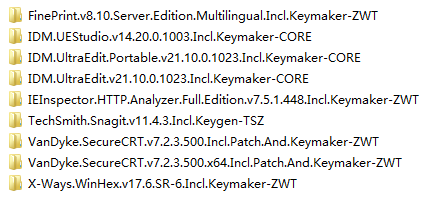
每个文件夹代表一个 appz 软件,打开是这个样子的:

里面是一系列 .zip 文件以及说明文件。这些 .zip 文件却不是使用 zip 的分卷压缩出来的,它们的内容如下:


要把这些 .zip 文件全部解压到同一个目录下,才可以得到一系列 rar 的分卷压缩文件。我们打开一个 .rar 文件,这才看到真正的内容:
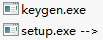
软件数量大的时候,人工重复进行上述操作就不合适了。机械的劳动应该交给程序。我们可以设计一个 PowerShell 脚本,完成一系列功能:
按照这个需求,我们可以编写如下 PowerShell 脚本:
$DebugPreference = 'Continue'

$incoming = 'd:\0day\incoming'
$temp1 = 'd:\0day\temp1'
$temp2 = 'd:\0day\temp2'
$output = 'd:\0day\output'

if (Test-Path $temp1) { del $temp1 -r }
if (Test-Path $temp2) { del $temp2 -r }

$apps = dir $incoming -Directory
$count = 0
$hasFailed = $false
$apps | foreach {
    $name = $_.Name
    Write-Progress -Activity 'Repacking apps' -PercentComplete ($count / $apps.Length * 100) -CurrentOperation $name
    echo "Repacking $name"

    md $temp1 | Out-Null
    md $temp2 | Out-Null

    # d:\0day\util\7z x -o"d:\0day\temp1" "d:\0day\incoming\VanDyke.SecureCRT.v7.2.2.491.Incl.Patch.And.Keymaker-ZWT\*.zip"
    $arguments = 'x', "-o""$temp1""", '-y', (Join-Path $_.FullName *.zip)
    .\7z $arguments | Out-Null

    if (!$?) {
        Write-Warning "Repacking $name failed."
        echo "$name" >> "$output\fail.log"

        del $temp1 -r
        del $temp2 -r

        $count++
        $hasFailed = $true
        return
    }

    # d:\0day\util\7z x -o"d:\0day\temp2" "d:\0day\temp1\*.rar" -y
    $arguments = 'x', "-o""$temp2""", '-y', "$temp1\*.rar"
    .\7z $arguments | Out-Null
    if (!$?) {
        Write-Warning "Repacking $name failed."
        echo "$name" >> "$output\fail.log"

        del $temp1 -r
        del $temp2 -r

        $count++
        $hasFailed = $true
        return
    }

    # copy d:\0day\temp1\*.diz d:\0day\temp2
    # copy d:\0day\temp1\*.nfo d:\0day\temp2

    dir $temp1 | where {
        $_.Extension -notmatch 'rar|r\d*'
    } | copy -Destination $temp2

    #d:\0day\util\7z a "d:\0day\output\VanDyke.SecureCRT.v7.2.2.491.Incl.Patch.And.Keymaker-ZWT.zip" "d:\0day\temp2\*.*" -r
    $arguments = 'a', "$output\$name.zip", "$temp2\*.*", '-r'
    .\7z $arguments | Out-Null
    if (!$?) {
        Write-Warning "Repacking $name failed."
        echo "$name" >> "$output\fail.log"

        del $temp1 -r
        del $temp2 -r

        $count++
        $hasFailed = $true
        return
    }

    del $temp1 -r
    del $temp2 -r

    Remove-Item -LiteralPath $_.FullName -r

    $count++
}

if ($hasFailed) {
    echo '' >> "$output\fail.log"
}

echo 'Press any key to continue...'
[Console]::ReadKey() | Out-Null

# del 'd:\0day\output\*.*' -r
您也可以在这里下载写好的脚本,包括完整的目录结构和 7z 软件包。请解压到 d:\ 中使用,或者自行调整脚本头部的路径。
用脚本批量下载www.cheat-sheets.org中的所有pdf文件
流水不腐,户枢不蠹。虽然批量下载有很多工具能做到,但是为了提高,我们尽量动手编写脚本吧。
http://www.cheat-sheets.org 里有很多好东西,我们把它批量下载下来。
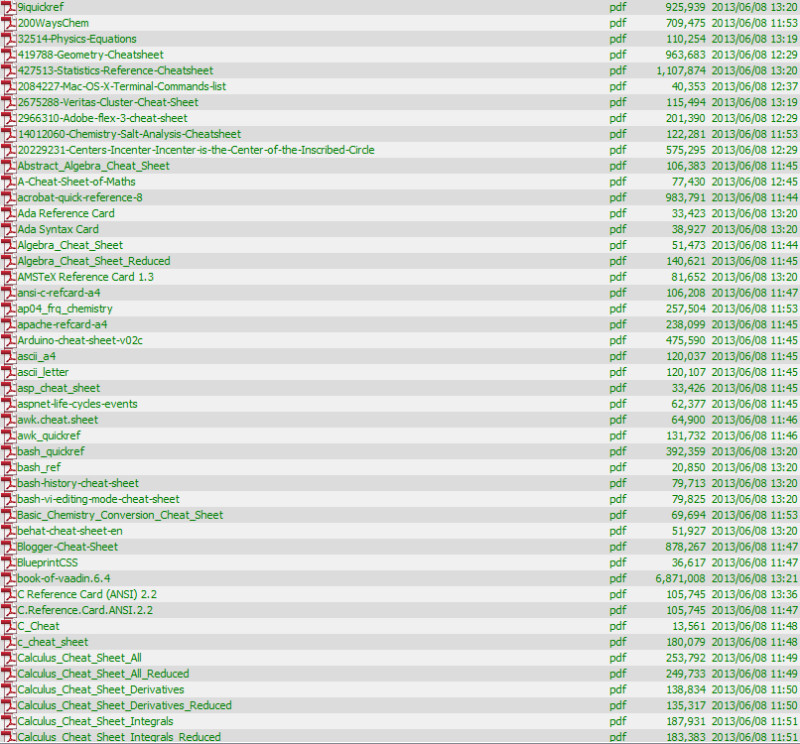
PowerShell代码:
Add-Type -AssemblyName System.Web
$baseUrl = 'http://www.cheat-sheets.org'
$result = Invoke-WebRequest $baseUrl
$result.Links |
    ? {$_.href -Like '*.pdf'} |
    select -ExpandProperty href |
    sort |
    % {
        if ($_ -like '/*')
        {
            $baseUrl + $_
        } else {
            $_
        }
      } |
     % {
        echo "Downloading $_"
        $fileName = $_.Substring($_.LastIndexOf("/") + 1)
        $localFileName = [System.Web.HttpUtility]::UrlDecode($fileName)

        if (Test-Path $localFileName) {
            return
        }
        Invoke-WebRequest -Uri $_ -OutFile $localFileName
        if (Test-Path $localFileName) {
            Unblock-File $localFileName
        }
     }
例如csdn下载的一个文件名字为 %5B大家网%5DWindows.PowerShell应用手册%5Bwww.TopSage.com%5D.pdf,我们通过两行PowerShell脚本把它转化为正常的 [大家网]Windows.PowerShell应用手册[www.TopSage.com].pdf。量大的时候特别好用。
方法如下:
Add-Type -AssemblyName System.Web
dir | % { ren -LiteralPath $_ ([System.Web.HttpUtility]::UrlDecode($_)) }
